Giant Crusher: Destroy & Grow: Free Online Robot Smashing Game
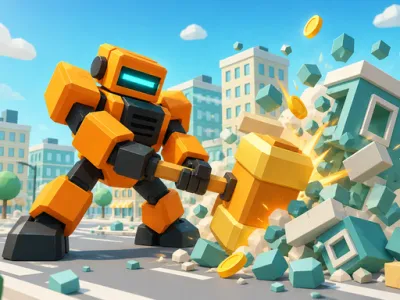
Walk a tiny hammer-swinging robot through 12 districts, smash everything in sight and evolve it into a towering giant.
Quick facts
- Category
- ⏳ Idle
- Price
- Free, no download or sign-up
- Plays on
- Computer, phone and tablet
- Screen
- Landscape
- Provided by
- GameMonetize
- Added
About Giant Crusher: Destroy & Grow
Your robot starts out small enough to look up at a crate. By the end, it will be stomping through cities. Giant Crusher: Destroy & Grow is a 3D smashing adventure where every swing of the hammer pays off in coins, and every coin helps your machine get bigger and meaner.
Unlike stationary smashers, you actually move around the map here. Walk your robot through each district, pick a target, and it will close in and start hammering on its own. Crates splinter, buildings crumble, and coins spill out for you to scoop up. Then it is off to the next target.
Those coins power a wide spread of upgrades: hit power, attack speed, coin earnings, movement and critical hits. As you invest, your robot passes through evolutions, with 17 forms to unlock as it grows from a pint-sized bot into a true giant. Helpers can be recruited to fight alongside you, drones add to your collection, and missions and daily rewards keep fresh goals on the table.
The world is big, too. There are 12 colorful districts to clear, each guarded by a boss that tests how strong your build really is. When progress starts to slow, you can rebirth for a permanent power boost and climb even faster the next time around. The game saves your progress, so your crusher is waiting for you when you return. Watching a robot you remember as tiny tower over the rooftops is a real treat, and each evolution changes how your machine looks as well as how hard it hits.
This destruction game hits a sweet spot between action and idle growth, which makes it great when you want something energetic but easy to control. A few rounds after school is plenty to unlock an upgrade or two. It runs on desktop with the keyboard and mouse or on touch screens with a joystick, includes ten languages, and is free in your browser with no download.
Want more? Browse Idle games.
How to Play
- Move your robot with WASD or the arrow keys, or drag the on-screen joystick on a touch device.
- Click or tap a crate or building to walk over and start attacking it automatically.
- Collect the coins that drop and spend them with the upgrade buttons.
- Clear each district and beat its boss to unlock new areas and evolutions.
- Use the settings menu to pause, change language, adjust music and effects, or go fullscreen.
Tips
- Upgrade coin earnings early. More coins per smash speeds up every other upgrade.
- Boost attack speed alongside power so your robot keeps a steady pace on bigger buildings.
- Grow stronger before challenging a district boss rather than rushing in under-powered.
- Rebirth once progress slows. The permanent power boost makes the next run noticeably quicker.
- Claim daily rewards and finish missions for extra resources.
FAQ
- Can I play Giant Crusher: Destroy & Grow on a phone or tablet?
- Yes. It supports touch controls with a drag joystick for movement and taps to pick targets, and it also plays on desktop with WASD or the arrow keys and the mouse.
- Does the game save my progress?
- Yes. Your progress is saved, so your robot and upgrades are there when you come back.
- What does rebirth do?
- Rebirth restarts your climb in exchange for a permanent power boost, so you come back stronger and progress faster.
- How many districts and evolutions are there?
- There are 12 districts, each with a boss, and 17 evolutions to unlock as your robot grows.